AWS Cloud Incident Analysis Query Cheatsheet
I’ve been teaching cloud incident response with Will Bengtson at Black Hat for a few years now, and one of the cool side effects of running training classes is that we are forced to document our best practices and make them simple enough to explain. (BTW — you should definitely sign up for the 2024 version of our class before the price goes up!) One of the more amusing moments was the first year we taught the class, when I realized I was trying to hand-write all the required CloudTrail log queries in front of the students, because I had only prepared a subset of what we needed. As I wrote in my RECIPE PICKS post, you really only need a handful of queries to find 90% of what you need for most cloud security incidents.
Today I want to tie together the RECIPE PICKS mnemonic with the sample queries we use in training. I will break this into two posts — today I’ll load up the queries, and in the next post I’ll show a sample analysis using them.
A few caveats:
- These queries are for AWS Athena running on top of CloudTrail. This is the least common denominator — anyone with an AWS account can run Athena. You will need to adapt them if you use another tool or a SIEM, but those should just be syntactical changes. Obviously you’ll need to do more work for other cloud providers, but this information is available on every major platform.
- These are only the queries we run on the CloudTrail logs. RECIPE PICKS includes other information these queries don’t cover, or that don’t cleanly match a single query. I’ll write other posts over time, showing more examples of how to gather that data, but none of it takes very long.
- In class we spend a lot of time adjusting the queries for different needs. For example, when searching for entries on a resource you might need to look in responseElements or requestParameters. I’ll try to knock out a post on how that all works soon, but the TL;DR is: sometimes the ID you query on is used in the API call (request); other times you don’t have it yet, and AWS returns it in the response.
- RECIPE PICKS is not meant to be done in order. It’s similar to a lot of mnemonics I use in paramedic work. It’s to make sure you don’t miss anything, not an order of operations.
With that out of the way, here’s a review of RECIPE PICKS (Canvas FTW):
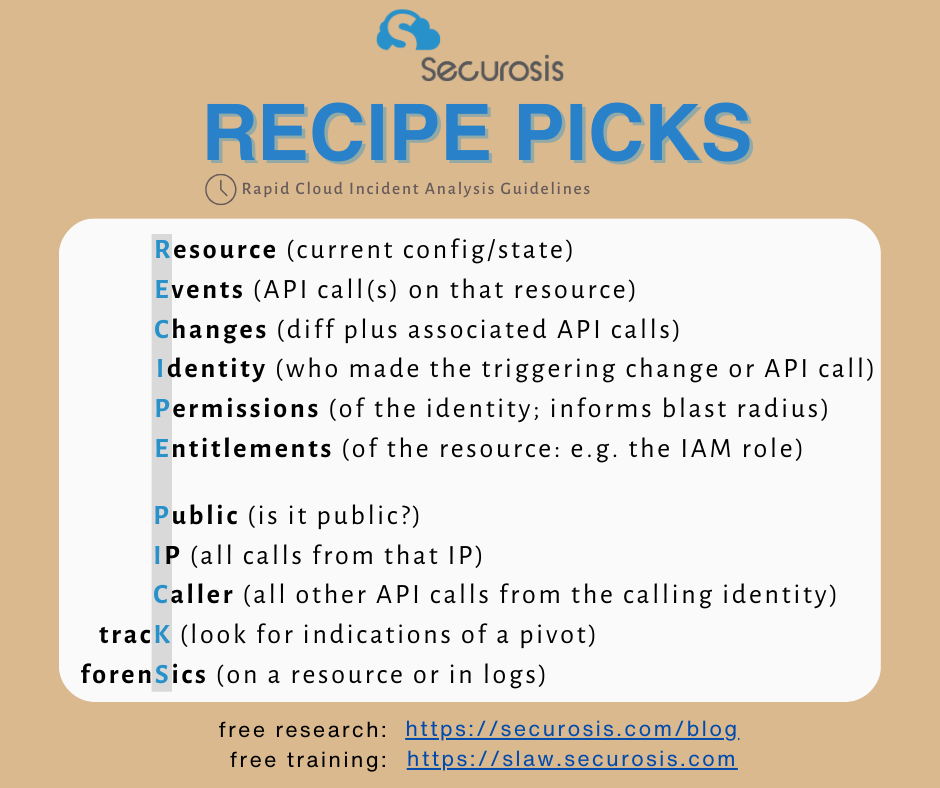
Now let’s go through the queries. Remember, I’ll have follow-on posts with more detail — this is just the main reference post to get started. A few things to help you understand the queries:
- For each of these queries, you need to replace anything between <> with your proper identifiers (and strip out <>).
- A “%” is a wildcard in SQL, so just think “*” in your head and you’ll be just fine.
- You’ll see me pulling different information on different examples (e.g., event name). In real life you might want to pull all the table fields, or different fields. In class we play around with different collection and sorting options for the specific incident, but that is too much for a single blog post.
Resource
If I have a triggering event associated with a resource, I like to know its current configuration. This is largely to figure out whether I need to stop the bleed and take immediate action (e.g., if something was made public or shared to an unknown account). There is no single query because this data isn’t in CloudTrail. You can review the resource in the console, or run a describe/get/list API call.
Events
Gather every API call involving a resource. This example is for a snapshot, based on the snapshot ID:
SELECT useridentity.arn, eventname, sourceipaddress, eventtime, resources FROM <your table name> WHERE requestparameters like '%<snapshot_id%' OR responseelements like '%<snapshot id>%' ORDER BY eventtime
Changes
Changes is a combination of the before and after state of the resource, and the API call which triggered the change associated with the incident. This is another one you can’t simply query from CloudTrail, and you won’t have a change history without the right security controls in place. This is either:
- AWS Config
- A CSPM/CNAPP with historical inventory
- A cloud inventory tool (if it has a history)
Many CSPM/CNAPP tools include a history of changes. This is the entire reason for the existence of AWS Config (well, based on the pricing there may be additional motivations). My tool (FireMon Cloud Defense) auto-correlates API calls with a change history, but if you don’t have that support in your tool you may need to do a little manual correlation. If you don’t have a change history this becomes much harder.
Worst case: you read between the lines. If an API call didn’t error, you can assume the requested change went through and then figure out the state.
Identity
Who or what made the API call? CloudTrail stores all this in the useridentity _ _ element, which is structured as:
`useridentity STRUCT<
type:STRING,
principalid:STRING,
arn:STRING,
accountid:STRING,
invokedby:STRING,
accesskeyid:STRING,
userName:STRING,
sessioncontext:STRUCT<
attributes:STRUCT< mfaauthenticated:STRING, creationdate:STRING>,
sessionissuer:STRUCT< type:STRING, principalId:STRING, arn:STRING, accountId:STRING, userName:STRING>,
ec2RoleDelivery:string,
webIdFederationData:map<string,string>
`
The data you’ll see will vary based on the API call and how the entity authenticated. Me? I keep it simple at this point, and just query useridentity.arn as shown in the query above. This provides the Amazon Resource Name we are working with.
Permissions
What are the permissions of the calling identity? This defines the first part of the IAM blast radius, which is the damage it can do. The API calls are different between user and role, and here’s a quick CLI script that can pull IAM policies. But if you have console access that may be easier:
`#!/bin/bash
Function to get policies attached to a user
get_user_policies() {
local user_arn=$1
local user_name=$(aws iam get-user –user-name $(echo $user_arn | awk -F/ ‘{print $NF}’) –query ‘User.UserName’ –output text)
echo “User Policies for $user_name:”
aws iam list-attached-user-policies –user-name $user_name –query ‘AttachedPolicies[*].PolicyArn’ –output text | while read policy_arn; do
aws iam get-policy –policy-arn $policy_arn –query ‘Policy.DefaultVersionId’ –output text | while read version_id; do
aws iam get-policy-version –policy-arn $policy_arn –version-id $version_id –query ‘PolicyVersion.Document’
done
done
}
Function to get policies attached to a role
get_role_policies() {
local role_arn=$1
local role_name=$(aws iam get-role –role-name $(echo $role_arn | awk -F/ ‘{print $NF}’) –query ‘Role.RoleName’ –output text)
echo “Role Policies for $role_name:”
aws iam list-attached-role-policies –role-name $role_name –query ‘AttachedPolicies[*].PolicyArn’ –output text | while read policy_arn; do
aws iam get-policy –policy-arn $policy_arn –query ‘Policy.DefaultVersionId’ –output text | while read version_id; do
aws iam get-policy-version –policy-arn $policy_arn –version-id $version_id –query ‘PolicyVersion.Document’
done
done
}
Check if ARN is for a user or role and call the appropriate function
ARN=$1
if [[ $ARN == arn:aws:iam:::user/ ]]; then
get_user_policies $ARN
elif [[ $ARN == arn:aws:iam:::role/ ]]; then
get_role_policies $ARN
else
echo “Invalid ARN. Please provide a valid IAM user or role ARN.”
fi`
Entitlements
What’s the difference between entitlements and permissions? One starts with a “P” and the other with an “E”, so I could make the mnemonic work. In this case are looking at the IAM blast radius of the affected resource. In other words, if the attacker compromised an EC2 instance or a Lambda function, what can it now potentially do? This is also not in the CloudTrail logs; but here’s a command line to pull, for example, the permissions of an EC2 instance (notice we need to get the instance profile if we are starting with the instance ID, which is common). The exact API calls vary based on the resource, but most of the time the root problem is an instance (or maybe a Lambda function):
`#!/bin/bash
Function to get policies attached to a role
get_role_policies() {
local role_name=$1
echo “Role Policies for $role_name:”
aws iam list-attached-role-policies –role-name $role_name –query ‘AttachedPolicies[*].PolicyArn’ –output text | while read policy_arn; do
aws iam get-policy –policy-arn $policy_arn –query ‘Policy.DefaultVersionId’ –output text | while read version_id; do
aws iam get-policy-version –policy-arn $policy_arn –version-id $version_id –query ‘PolicyVersion.Document’
done
done
echo “Inline Policies for $role_name:”
aws iam list-role-policies –role-name $role_name –query ‘PolicyNames’ –output text | while read policy_name; do
aws iam get-role-policy –role-name $role_name –policy-name $policy_name –query ‘PolicyDocument’
done
}
Get the instance profile associated with the instance
get_instance_profile() {
local instance_id=$1
aws ec2 describe-instances –instance-ids $instance_id –query ‘Reservations[].Instances[].IamInstanceProfile.Arn’ –output text
}
Get the role name from the instance profile
get_role_name() {
local instance_profile_arn=$1
aws iam get-instance-profile –instance-profile-name $(echo $instance_profile_arn | awk -F/ ‘{print $NF}’) –query ‘InstanceProfile.Roles[*].RoleName’ –output text
}
Check if the instance ID is provided
if [ -z “$1” ]; then
echo “Usage: $0 "
exit 1
fi
INSTANCE_ID=$1
Get the instance profile ARN
INSTANCE_PROFILE_ARN=$(get_instance_profile $INSTANCE_ID)
if [ -z “$INSTANCE_PROFILE_ARN” ]; then
echo “No instance profile associated with instance ID $INSTANCE_ID”
exit 1
fi
Get the role name
ROLE_NAME=$(get_role_name $INSTANCE_PROFILE_ARN)
if [ -z “$ROLE_NAME” ]; then
echo “No role associated with instance profile $INSTANCE_PROFILE_ARN”
exit 1
fi
Get the policies associated with the role
get_role_policies $ROLE_NAME `
And if you haven’t figured it out by now, I’m totally using ChatGPT to generate these little scripts — in real life I use my commercial tool to get this info.
Public
Is the involved resource public? You should be able to determine this from your inventory/CSPM. A lot of AWS resources can potentially be made directly public, and even more if they are linked to a public resource, such as a database connected to a public server. A single API call or query will rarely tell you whether something is public, so this can take a bit of investigation. Heck, AWS themselves has to use automated reasoning (a kind of machine learning) to know whether an S3 bucket is public.
This list by Scott Piper includes most of what can be directly public. It hasn’t been updated in a few years, but is still your best place to start.
IP
What other API calls originated from the same IP? If this is from a non-AWS IP you can look for things like whether the attacker compromised multiple IAM credentials. The Identity is more important in cloud incidents, but sometimes you can still see valuable activity by looking at the IP addresses involved.
SELECT awsregion, eventname, eventtime, useragent FROM WHERE sourceIpAddress = '<IP address>' ORDER BY eventtime
Caller
What else did the identity which triggered the incident do? This is usually the second or third query I run. First I check the API calls on the resource, then I see all the other API calls from the identity I suspect. Sometimes I run this on the ARN, sometimes the username, and other times the particular Access Key that was used. Here are a couple examples of username, role name, and Access Key — but you can run this on any field in useridentity :
SELECT eventname, useridentity.username, sourceIPAddress, eventtime, requestparameters from where useridentity.username = 'username' order by eventtime asc;
SELECT awsregion, eventname, eventtime, useridentity.arn FROM <your table name> WHERE useridentity.arn like '%LambdaOps%' ORDER BY eventtime
SELECT eventTime, eventName, userIdentity.principalId FROM WHERE userIdentity.accessKeyId like 'access_key_id'
Track
This is all about following the attacker if they were able to compromise and pivot to a different identity. Moving from a lower privileged IAM user or role to a higher one is the most common form of privilege escalation.
This will be a combination of the queries above. There are two main techniques we see:
- The attacker compromises a resource like an EC2 instance with a role, or exfiltrates those credentials, then uses those privileges.
- To track this follow the API calls from the potentially compromised role, and try to determine whether they got access by directly compromising the resource (e.g., exploiting a vulnerability) or by using lower privileged credentials (e.g., they had permission to run an instance and attach a role, and were able to attach a role with admin privileges).
- The attacker “role chains” by using one IAM user or role which can assume the privileges of another role, and then follows a chain until they find a role with higher privileges.
The main API events to look for are:
- sts:AssumeRole
- sts:AssumeRoleWithSAML
- sts:AssumeRoleWithWebIdentity
In class we cover more, including tracing back the useridentity.arn and enriching with userAgent , which can reveal a lot of valuable information.
Forensics
This is nearly always the last part of your analysis, and includes digging into additional log sources or running forensics on an instance or container. If you have a background in network logs, host forensics, and other “traditional” analysis activities, this is where you get to apply those skills.
One interesting CloudTrail inquiry to add here is to look for denied/unauthorized API calls. This can often indicate reconnaissance, especially someone trying to figure out what their permissions are. This is time-bound because… you can get a lot of data from it:
SELECT count (*) as TotalEvents, useridentity.arn, eventsource, eventname, errorCode, errorMessage FROM <your table name> WHERE (errorcode like '%Denied%' or errorcode like '%Unauthorized%') AND eventtime >= '2019-10-28T00:00:00Z' AND eventtime < '2019-10-29T00:00:00Z' GROUP by eventsource, eventname, errorCode, errorMessage, useridentity.arn ORDER by eventsource, eventname
That was a lot, but only barely scratched the surface. I know some of you have other preferred queries, but this should be a good start. I hope to keep this post updated, so please email me if you have suggestions for improvement!
And don’t forget to sign up for our Black Hat class!